|
CMSDK 2.0.1
Cross-platform C++ base library and SDK for the Psyclone AIOS platform
|
|
CMSDK 2.0.1
Cross-platform C++ base library and SDK for the Psyclone AIOS platform
|
This page explains the ideas that make a Psyclone system tick: publish– subscribe, triggers, contexts, signals, and the split between code and PsySpec. If you only read one page before writing code, read this one.
Psyclone is based on the publish–subscribe principle. Modules never call each other; they post messages and subscribe to message types. Every message carries a dot-delimited type (Input.Audio.Raw, robot.sensor.bumper), and each module declares — in the PsySpec, not in code — which types it wants via <trigger> entries. When a message of a matching type is posted anywhere in the system, every subscribed module is woken up with a copy.
This gives you the classic pub/sub payoffs:
Message types should follow the convention of a dot-delimited string where the first segment is a root namespace and later segments increase in specificity left to right (MyProject.Input.Audio.Raw). Wildcards such as Psyclone.*.MySpace.Connect are supported in trigger types.
A module is a named unit declared in the PsySpec. What it does is its crank: a C/C++ function with the signature
exported from a library that the PsySpec loads. The crank receives a cmlabs::PsyAPI handle — its one window onto the system — through which it waits for triggers, posts output, emits signals, reads parameters, and queries whiteboards and catalogs. Every module has two distinct concerns and only one of them is yours: message handling (receiving, queuing, routing, posting) is done by the system; message processing is the crank. Details in Writing a Module (Crank).
A <trigger> subscribes the module to a message type:
The name is local to the module: when the crank wakes up, cmlabs::PsyAPI::waitForNewMessage() reports which named trigger fired, so one crank can react differently to different inputs without parsing types. Useful attributes seen throughout the examples:
A context is a named, hierarchical, system-wide state, written as a dot-delimited tree path: SoB.Alive.Awake, Battery.Low, Test.PingPong. Any module can post a context change, and modules can declare that their triggers are only live while a given context is active:
The rules:
Contexts are the tool for managing complexity at scale: a large system rarely needs all of its modules at once. Instead of littering module code with mode flags, you switch whole groups of modules on and off — and change which crank a trigger fires — by posting one context:
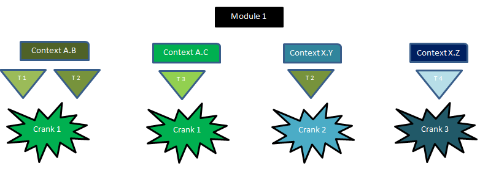
While context A.B is active, types t1/t2 fire crank 1; after a switch to A.C, crank 1 is instead fired by t3. The same trigger type can fire different cranks in different contexts, and if two contexts with different roots are active simultaneously, one message can fire two cranks. See Examples/contexts.xml and Examples/contextprint.xml for runnable demonstrations, including the case of a module whose context never activates.
Besides typed messages, modules can communicate through signals — named, system-wide broadcasts that need no subscription routing:
A signal is broadcast to every space in the whole system and all waiting modules are released at the same time, optionally with a payload message. Signals are the lowest-latency path in the system and are also how context changes propagate. See Examples/signals.xml and Examples/src/Examples.cpp (SignalPing/SignalPong).
Messages are cmlabs::DataMessage objects: flat, binary, self-describing containers. A crank fills one with typed user entries and posts it:
Entries can be strings, integers, floats, times, binary blobs and nested messages — plus arrays (integer-indexed) and maps (string-indexed) of each. Because the whole message is one flat allocation, posting it means copying it verbatim into shared memory; delivery to another process on the same node never serialises or parses anything, and delivery to another machine sends the same bytes over a socket (see cmlabs::DataMessage and Messaging).
The lifecycle of a posted message:
CMSDK uses numeric identifiers in two entirely separate ways, and mixing them up is a classic source of connection failures:
So a gateway with id 1 can happily listen on port 10000 — the two numbers live in different spaces and never interact.
The crank gets input and returns output but does not know where either comes from or goes: sources and destinations — subscriptions, signals, retrieves, queries, posts — are all PsySpec. This is what makes modules genuinely modular: the same compiled crank can be instantiated several times under different names with different wiring and different parameters (ping-pong runs the same function as both players in Examples/pingpong.xml). The PsySpec is the single place where a system's architecture can be read, reviewed and changed. Continue with Writing a PsySpec.
 1.15.0